The AI calling agent
built into Odoo 17.
Purpose-built for US sales and RevOps teams running Odoo. Genie Dial installs directly into Odoo CRM, calls every new lead in under 60 seconds, transcribes the conversation, tags the outcome and books the next follow-up — with zero human intervention.
Odoo 17 · Third Party · LGPL-3 · 2 437 LOC
300%
Conversion Uplift
<60s
Speed to Lead
24/7
Auto Follow-up
2437
LOC · Odoo 17 Module
How it works inside Odoo
Not a plugin.
A native Odoo 17 module.
Genie Dial extends the CRM app with new menus and buttons — Call Now, Schedule Call, AI Call History, Scheduled Calls, Analytics and Follow-up Rules — so your team keeps working in Odoo, not in another dashboard.
Book a walkthrough →Install
Deploy the Genie Dial module on your Odoo 17 instance — depends only on CRM, Discuss, Calendar and Contacts.
Configure
Set your AI assistant, follow-up rules and tag patterns from the Configuration menu.
Trigger
Manual (Call Now), scheduled, or automatic on new lead — all from inside the CRM.
Sync back
Transcript, summary, tags and recording land on the lead chatter and AI Call History.
Everything Genie Dial adds
to your Odoo CRM.
Six native modules inside one install — no external dashboards, no data drift.
One-click Call Now
Every crm.lead gets Call Now and Schedule Call buttons. Trigger an AI conversation without leaving the Odoo pipeline.
- → Manual + automatic triggers
- → AI Calls counter on lead
- → No dialer switching
AI Call History
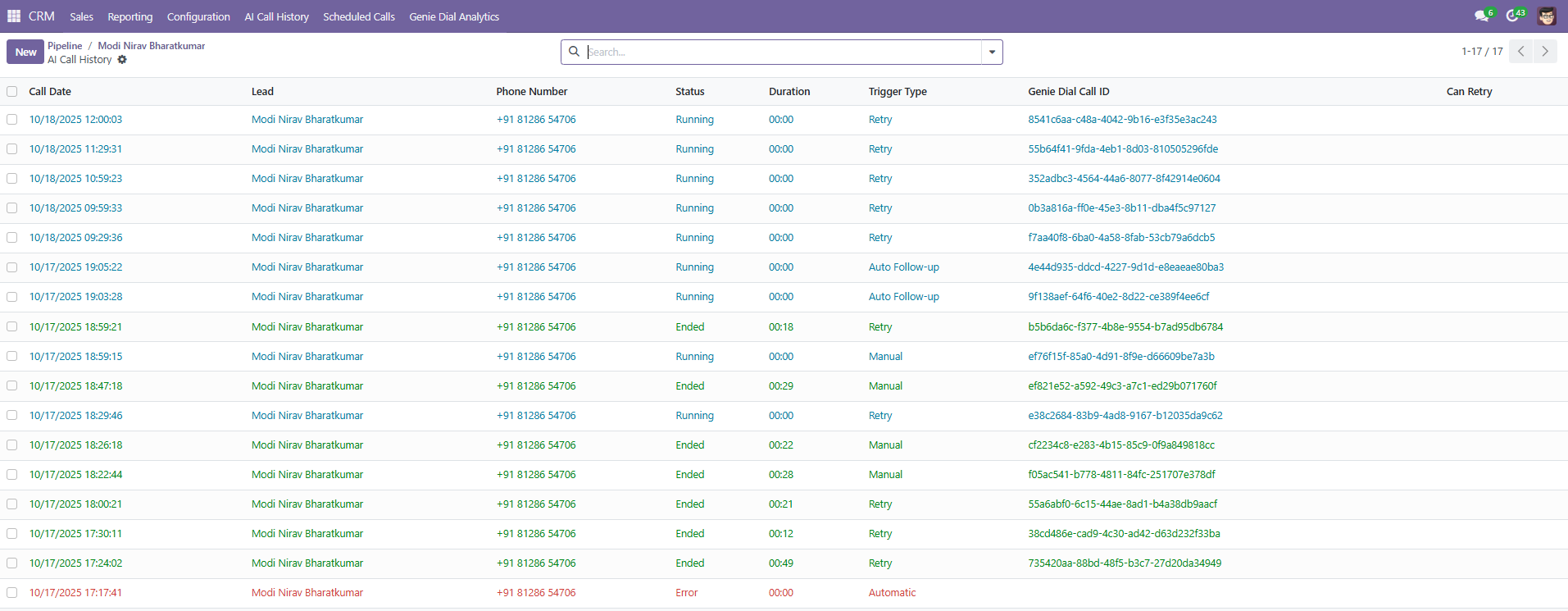
A dedicated menu logs every call: date, lead, phone, status, duration, trigger type and Genie Dial Call ID — searchable and filterable.
- → Running / Ended / Error states
- → Retry from history
- → Full audit trail
Scheduled Calls
Book AI calls for a specific date, time and timezone. Test timezone conversion before saving, then let the agent dial automatically.
- → Timezone-aware scheduling
- → Optional assistant ID
- → Bulk scheduling
Configurable Follow-up Rules
Match call outcomes to tag patterns like INTERESTED, READY, CALLBACK, NO_ANSWER, NOT_INTERESTED and trigger the right next action.
- → Human Task or AI Call
- → Auto stage updates
- → Sequenced rules
Transcript, Summary & Recording
Every ended call ships a natural-language summary, full transcript, MP3 recording and structured tag JSON — all inside the lead chatter.
- → AI-written summary
- → Multi-lingual transcript
- → S3 recording link
Genie Dial Analytics
Native Odoo dashboard: call volume over time, outcomes, tag distribution and pipeline impact — sliced by rep, tag or trigger type.
- → Bar / line / pie views
- → Filterable measures
- → Zero setup
Product Tour
A guided look at every screen inside the module.
Step 01
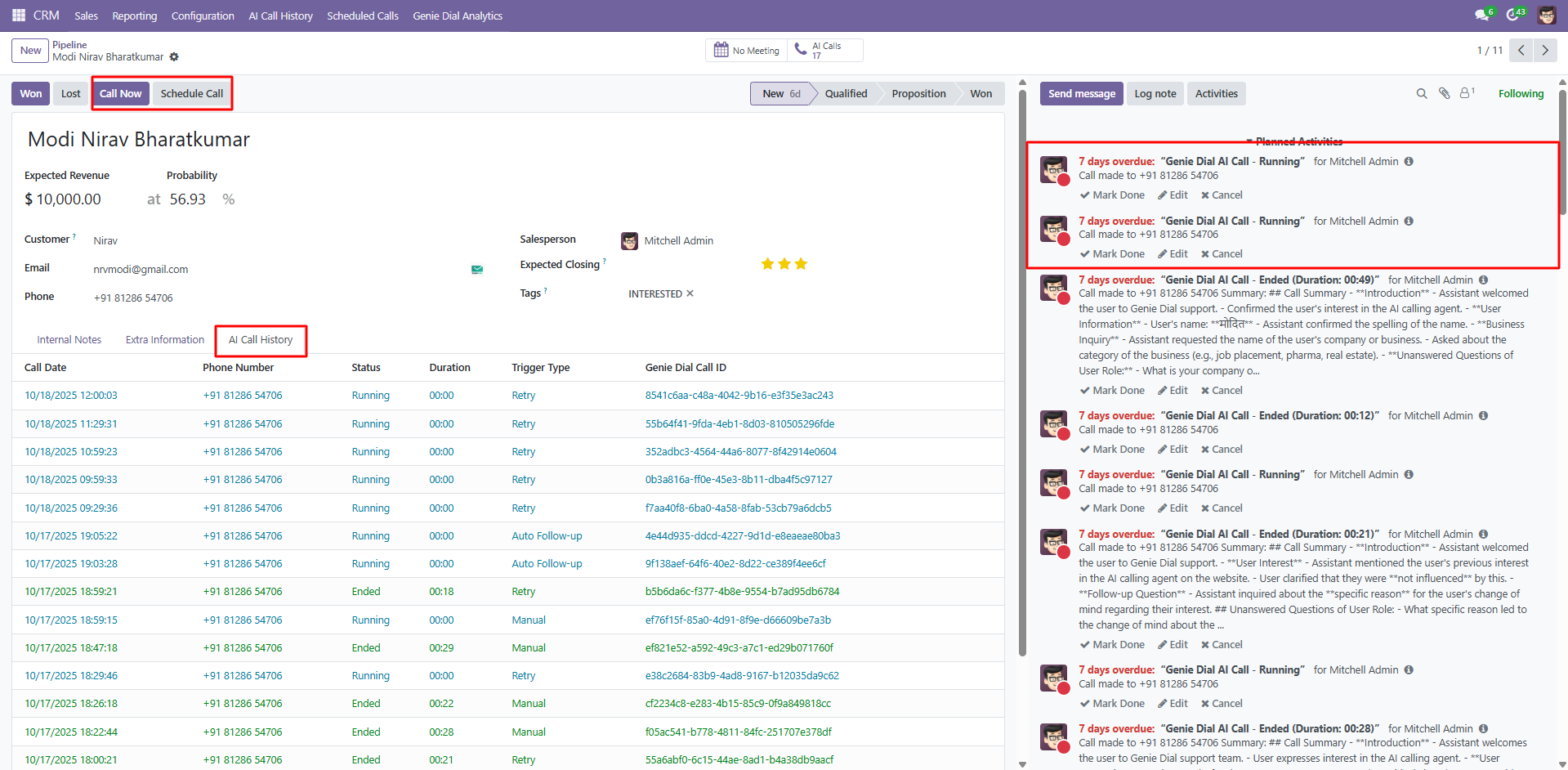
Odoo CRM lead with Call Now
Native Call Now, Schedule Call and AI Calls counter appear on every crm.lead — plus a dedicated AI Call History tab.
Step 02
AI Call History dashboard
Track every AI conversation with status, duration, trigger type and Genie Dial Call ID.
Step 03
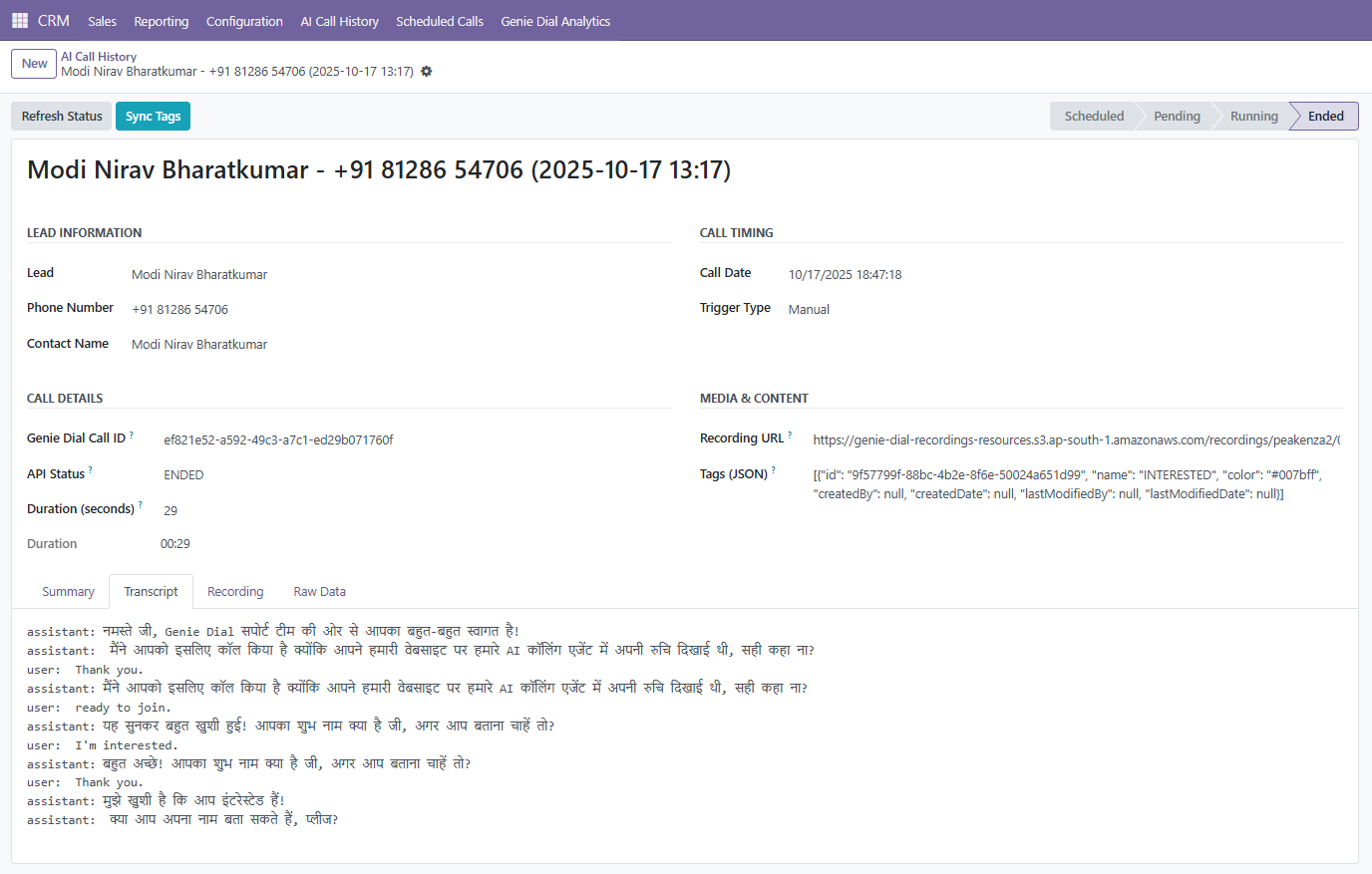
Call transcript in your language
Full multilingual transcript — including Hindi — attached to the lead the moment the call ends.
Step 04
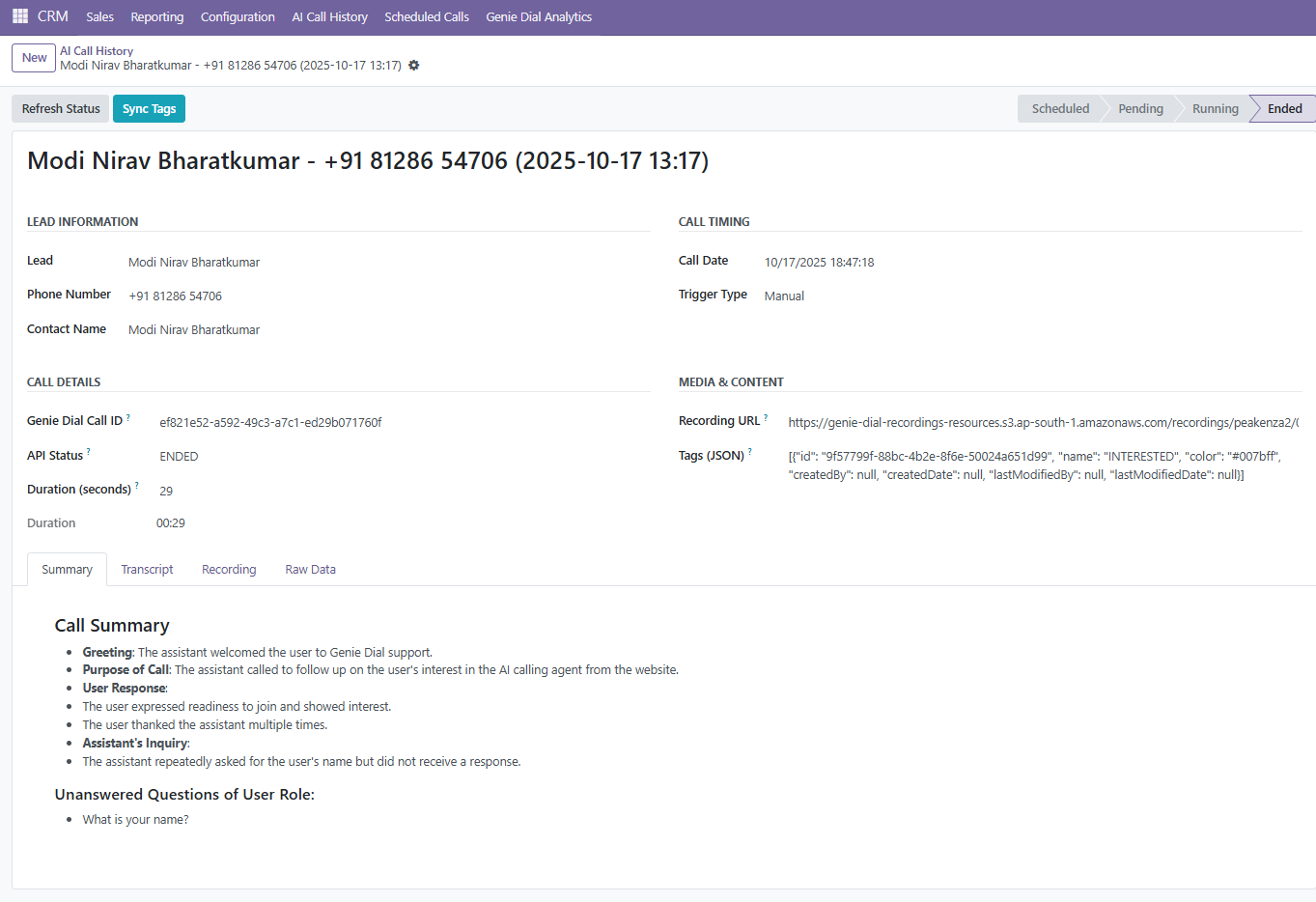
AI-written call summary
Structured summary of intent, purpose, user response and unanswered questions, ready for your sales rep.
Step 05
Follow-up Rules engine
Configure tag patterns (INTERESTED, READY, CALLBACK, NO_ANSWER, NOT_INTERESTED) to trigger the right next action automatically.

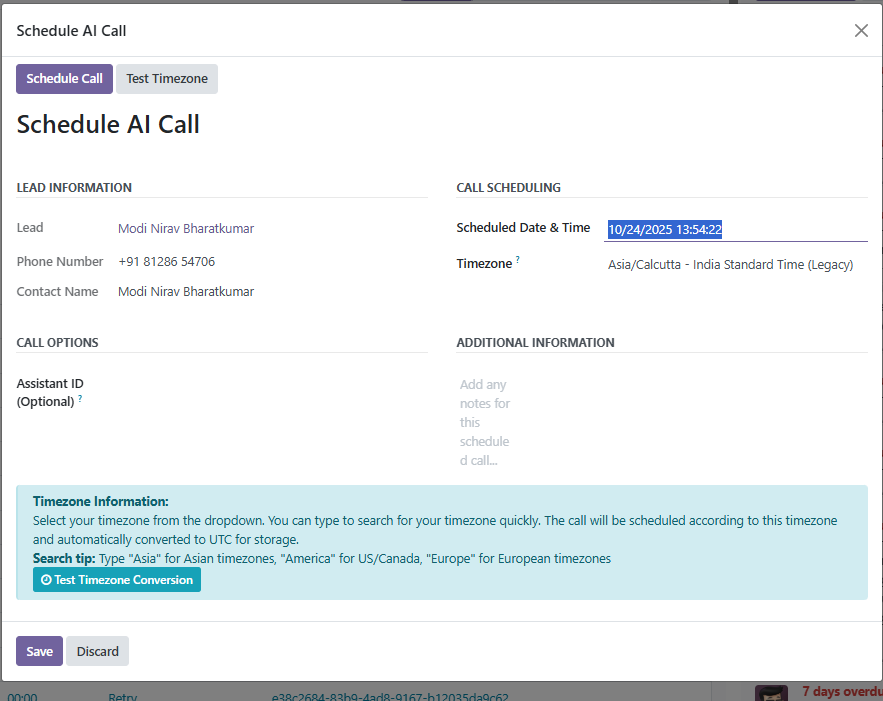
Step 06
Schedule AI Call
Book AI calls in any timezone and test the conversion before saving.
Purpose-built for the Odoo workflows sales teams already run.
SALES
Instant new-lead calling
Genie Dial calls every new crm.lead automatically, qualifies the buyer and updates the pipeline stage without human intervention.
REVIVE
Auto Follow-up on cold leads
Configure tag-based rules so NO_ANSWER and NOT_INTERESTED leads are re-dialed on your cadence and moved back into the funnel.
SUPPORT
Callback & appointment confirmation
CALLBACK-tagged leads get scheduled voice callbacks; appointment reminders sync with Odoo Calendar automatically.
MULTILINGUAL
Hindi + English + 25 more
The assistant switches languages mid-call — perfect for Indian and multilingual markets running Odoo 17.
Genie Dial Analytics
Every call, measurable
in the same Odoo you already trust.
Native Odoo bar, line and pie views on top of Genie Dial call data. Slice by tag, trigger type, salesperson or date to prove ROI without a data team.
Book a walkthrough →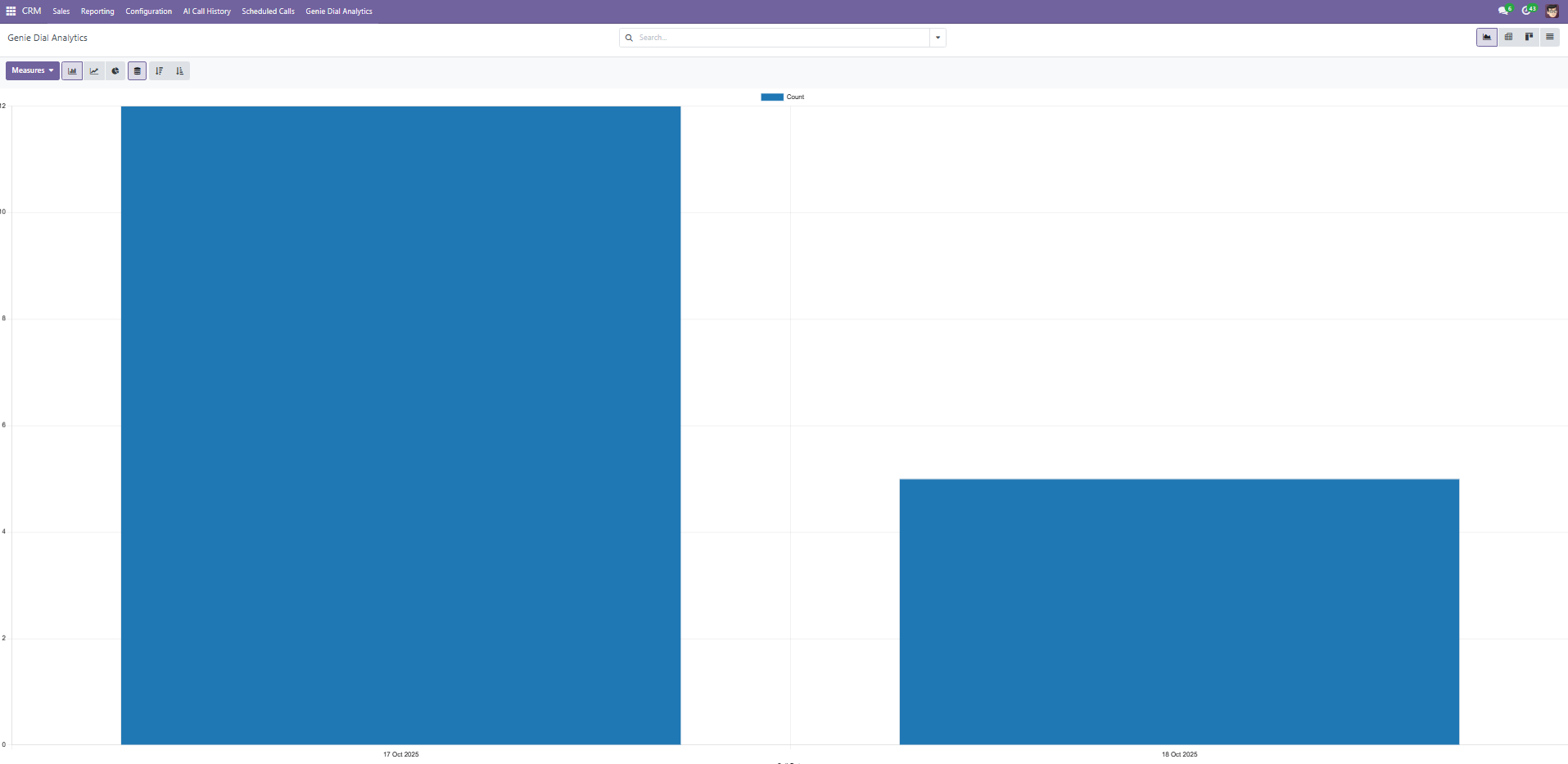
The Voice-ERP Report
Engineering insights for Odoo-centric organizations.

Guide · 12 min
AI Calling Agent for Odoo ERP: 2026 Guide
A 2026 guide to running an AI calling agent inside Odoo ERP — architecture, workflows, security and rollout playbook.

ROI · 10 min
Odoo CRM Call Automation ROI (US, 2026)
The finance-grade ROI model US teams use to evaluate AI call automation on Odoo CRM — costs replaced, payback math in USD.

Engineering · 11 min
Integrate an AI Voice Agent with Odoo (2026)
Engineering walkthrough for wiring an AI voice agent into Odoo — auth, model mapping, chatter logging, webhooks and security.

Comparison · 11 min
GenieDial vs Odoo VoIP Integrations (2026)
How an AI calling agent for Odoo compares to traditional Odoo VoIP integrations like Ringover and Axivox — features, cost and outcomes.
Pillar Guide · 14 min
Odoo VoIP Integration: The Complete Guide (2026)
The complete 2026 guide to Odoo VoIP integration — how it works, provider options (Axivox, Ringover, 3CX, Twilio), setup, pricing and when to add AI.
Pricing · 9 min
Odoo VoIP Pricing Explained (2026)
Real Odoo VoIP pricing for 2026: Enterprise + Axivox, Ringover, Aircall, 3CX and Twilio-based modules — line-item costs for a 10-seat US team.
Comparison · 8 min
Axivox vs GenieDial for Odoo: Honest Comparison (2026)
Axivox is Odoo's bundled VoIP. GenieDial is an AI calling agent for Odoo. Honest side-by-side: what each does, when each wins, real 2026 pricing.
Comparison · 8 min
Ringover + Odoo Integration: Setup, Limits, Alternatives
How Ringover's Odoo integration works in 2026 — click-to-dial, call logging, its real limits and when to pick an alternative.
Tutorial · 7 min
How to Set Up Click-to-Call in Odoo CRM (2026)
Step-by-step: enable click-to-call in Odoo CRM in 2026 — Enterprise, Community, VoIP module, SIP setup and troubleshooting.
Guide · 9 min
Odoo Call Center Setup: What You Actually Need
The real Odoo call center stack in 2026 — VoIP, queues, IVR, wallboards and CRM sync. What matters and what's noise.
Compliance · 8 min
Odoo Call Recording: Options and Compliance (2026)
How Odoo call recording works in 2026 — storage, retention, consent, TCPA and state two-party consent rules for US teams.
Pillar · 13 min
AI Voice Agents for Outbound Sales: A Practical Guide (2026)
The practical 2026 guide to AI voice agents for outbound sales — what they do, where they win, pricing, compliance and how to evaluate vendors.
Playbook · 10 min
AI Cold Calling: What Works in 2026 (and What Doesn't)
AI cold calling in 2026 — what actually converts, what triggers rejection, TCPA and AI disclosure rules, and how to build the outbound stack.
Use Cases · 9 min
Conversational AI for Sales: Use Cases That Pay Back
Conversational AI for sales in 2026 — the specific use cases with measurable payback, from speed-to-lead to demo booking and AR follow-up.
Comparison · 9 min
AI SDR Tools Compared: When to Use One (and When Not To)
AI SDR tools compared for 2026 — Regie, 11x, AiSDR, Artisan and vertical alternatives. What each does well, where they fail, and when to skip the category.
Checklist · 6 min
Voice AI for Sales Teams: Buyer's Checklist
A one-page buyer's checklist for voice AI in sales — the questions to ask, the metrics to measure, the red flags to walk away from.
Compliance · 9 min
Outbound AI Calls: Compliance, DNC, and Consent (US, 2026)
The 2026 US compliance rulebook for outbound AI calls — TCPA, DNC, state AI-disclosure laws, two-party recording consent, STIR/SHAKEN.
Buyer Guide · 9 min
Best AI Dialer: How to Evaluate Vendors (2026)
How to pick the best AI dialer in 2026 — the 8-criteria buyer framework we use to shortlist vendors without falling for demo-day polish.
Industry · 9 min
AI Calling Agent for Manufacturing (Odoo): 2026 Use Cases
How manufacturers use AI calling agents inside Odoo — RFQ follow-up, supplier callbacks, AR chasing, service dispatch and reorder outreach.
Industry · 8 min
AI Calling Agent for Real Estate (Odoo): 2026 Playbook
AI calling agents for real estate teams on Odoo — inbound lead speed-to-call, listing inquiries, showing confirmations and past-client reactivation.
Industry · 9 min
AI Calling Agent for Healthcare (Odoo): Use Cases and Compliance
AI calling agents for healthcare on Odoo — appointment reminders, no-show recovery, AR calls and referral follow-up, with HIPAA-aware guardrails.
Featured comparison
GenieDial vs Odoo VoIP integrations (Ringover, Axivox, 3CX) — how an AI calling agent compares on cost, speed-to-lead and Odoo-native depth →
Ready for the
Next Dial?
Book a 30-minute session and we'll deploy Genie Dial on your Odoo 17 instance with your scripts, tags and follow-up rules.
Technical FAQ
Which Odoo versions are supported?+
The Genie Dial AI Call module is published on the Odoo App Store for Odoo 17, running on Odoo Online, Odoo.sh and On-Premise. Custom on-premise deployments are supported via our secure bridge.
What does the module install inside Odoo?+
AI Call History, Scheduled Calls, Genie Dial Analytics and Follow-up Rules menus in the CRM app, plus Call Now and Schedule Call buttons on every lead. Dependencies: CRM, Discuss, Calendar and Contacts.
How are transcripts, summaries and recordings stored?+
Each ended call attaches an AI summary, full transcript, MP3 recording URL and structured tag JSON to the Odoo lead's chatter and AI Call History record.
Does it support Hindi and other languages?+
Yes — English, Hindi and 25+ languages, with natural code-switching mid-call.
Is the voice latency human-like?+
Yes. Genie Dial keeps sub-500ms end-to-end response times using low-latency streaming and optimized LLM inference.
How is our data secured?+
AES-256 encryption at rest, TLS in transit, SOC 2 and GDPR-aligned controls, and optional deployment inside your own VPC.